|


TDS CPC Notice under Section 200A: Meaning, Reasons & How to Respond
TDS CPC notice Section 200A is a TDS notice highlighting discrepancies between what you reported and what the system calculated. This notice is an intimation, not an assessment order and needs a proper and fast response. Continue reading the article to learn what the Section 200A TDS notice is, how to respond to the income tax notice 200A TDS and the interest or late fee charged.
Key takeaways
- TDS notice under Section 200A is a system-driven intimation by the CPC.
- Authorities must issue a TDS notice within one year from the end of the financial year in which TDS returns are filed.
- Reasons for TDS CPC notice Section 200A include TDS non-deduction/ short-deduction, challan mismatch, delayed returns, or late TDS deposit.
- There are multiple ways to navigate on the TRACES portal to download/check the status of the TDS CPC Notice u/s 200A.
- One must download the justification report and file the correction returns as part of the procedure to respond to the TDS notice under Section 200A.
What is Section 200A Intimation?
TDS notice under Section 200A is a system-driven and computer-generated intimation by the tax department to the TDS deductor. Section 200A of the Income Tax Act basically states that the department processes your TDS returns upon filing, known as TDS processing under 200A.
The Centralised Processing Centre (CPC) for TDS is managed through the TRACES portal and processes the TDS returns to identify discrepancies, if any. PAN errors, delayed filing, challan mismatch, and miscalculated interest are common examples of discrepancies.
The department usually has to issue a TDS notice within one year from the end of the financial year in which TDS returns are filed. Such intimation is also a TDS notice of demand under Section 156 of the Income Tax Act. However, it is not always an order to pay. Mostly, it is just a confirmation that your return is accepted as filed and hence called a 200A intimation.
Reasons for Receiving TDS CPC Notice under Section 200A
Some of the most common reasons for receiving TDS CPC Notice under Section 200A are below-
Non-deduction or short-deduction of TDS: The deductor fails to deduct or deducts less than the required amount of TDS due to a simple typo, wrong application of the TDS rate, missing a PAN-linked exemption or an inoperative PAN.
Challan mismatch: When the TDS challan fails to match details in the TDS return, it must be due to a wrong BSR code, incorrect challan serial number or date, or keying wrong amounts.
Delayed filing of TDS returns: Any delay in filing TDS returns beyond the due date automatically triggers late fees of Rs.200 per day of delay under Section 234E of the Income Tax Act, through Section 200A TDS notice.
Late deposit of TDS: In case the TDS deposit is made beyond the due date of the 7th of the following month (30th April for March), you receive this TDS CPC Notice under Section 200A.
Components of a Section 200A TDS Notice
When you open a Section 200A TDS notice, it primarily consists of the following details-
- TAN, financial year and quarter
- Summary of returned figures versus processed figures
- Interest under Section 201(1A)
- Late fee under Section 234E
- Net demand payable or refund
Thereafter, the annexure to Section 200A TDS notice elaborates the issues, detailing the row number, Deductee, and challan reference.
How to Check and Download TDS CPC Notice
There are various ways to access your TDS CPC notice Section 200A and download it. Let’s show you the simplest way:
- Log in to TRACES using your TAN.
- Navigate to the ‘Communications’ tab.
- Select ‘Inbox’ where you can find the TDS CPC notice/intimations u/s 200A.
- Click on ‘View details’ against the respective TDS notice/intimation to see further details of that intimation.
- Click on the ‘Request for Download Intimation’/‘Request for Justification Report’ buttons to proceed with downloading intimation. It will usually be enabled for cases of PAN errors and TDS demand.
- After this request, a request number is generated. Wait for 24-48 hours for the download to complete.
- Go to Dashboard > Downloads > Click on ‘Requested downloads’ to check the status of downloads. Filter by request date/request number.
- If the status has changed to ‘Available’ against the respective TDS CPC notice 200A, then click on the row to select it and click on the ‘HTTP download’ button to finish downloading the file on your system.
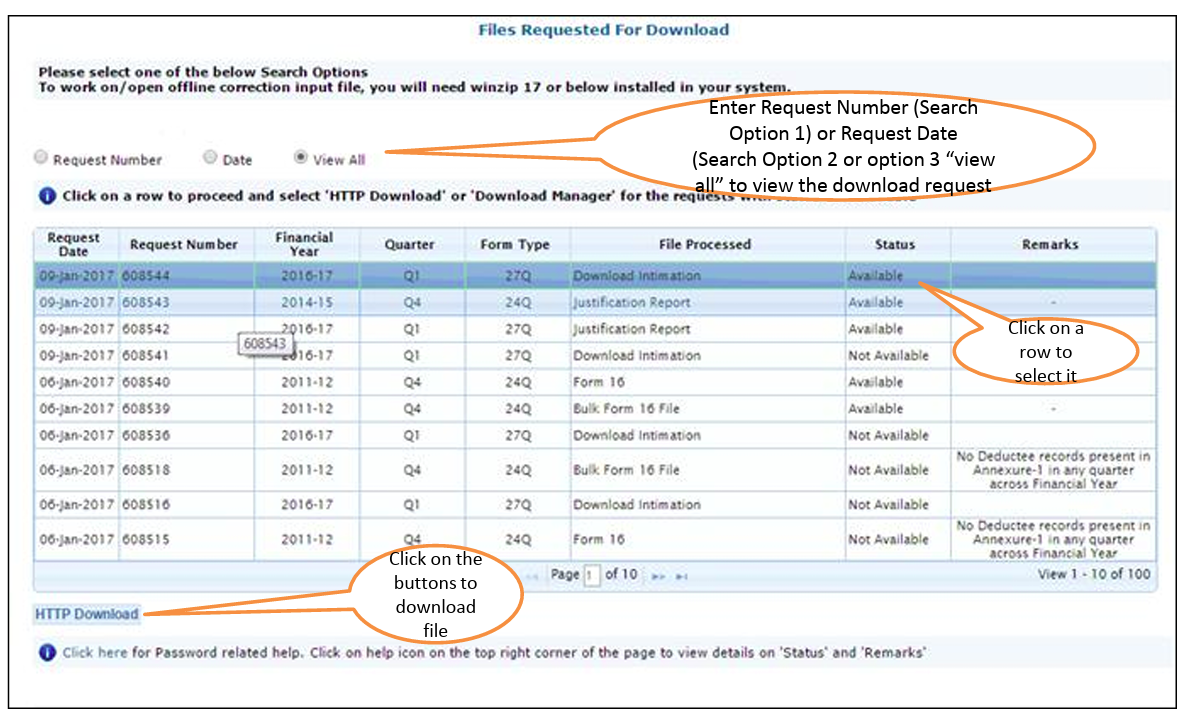
For details about downloading the justification report in case of demand, read our article on Download Justification Report to Reply to TDS Demand Notice.
Steps to Resolve a Section 200A Notice
Let’s assume you have a default notice under Section 200A. Follow simple steps to resolve a Section 200A Notice:
Step 1: Identify the nature of default in the 200A TDS intimation- whether it is short-deduction/short-payment, PAN error, challan mismatches, etc. Follow the steps detailed in the previous section ‘Downloading the TDS CPC Notice and justification report’.
Step 2: Reconcile or cross-check with your filed returns from your end. Compare the challan details carefully.
Step 3: If the demand is correct, make payment through the challan ITNS 281. Else, skip this step.
Step 4: Log in to the TRACES > Go to ‘Defaults’ > Click on the row pertaining to the period of default you are working on and click on the ‘Request for Correction’ button to proceed.
Note: The type of correction can vary depending on what needs to be corrected.
Step 5: File the correction return, either tagging the payment towards demand or filing the correct details.
The default status in TRACES changes to ‘Closed’, indicating that the resolution is complete.
Interest and Late Fee under Section 200A
Both interest and late fee are applicable in different situations. Where there is a delay in filing returns, a late fee is chargeable. On the other hand, levy of interest happens upon delay in deduction and/or payment of TDS with the authorities.
Under Section 234E, a late fee of Rs. 200 per day is levied for every day the return is delayed, capped at the total TDS amount.
You have to pay interest under Section 201(1A) as follows:
- 1% per month or part of the month for delayed deduction and
- 1.5% per month or part of the month for delayed payment after deduction.
The CPC auto-computes this interest and late fee during TDS processing under Section 200A.
Frequently Asked Questions


Clear offers taxation & financial solutions to individuals, businesses, organizations & chartered accountants in India. Clear serves 1.5+ Million happy customers, 20000+ CAs & tax experts & 10000+ businesses across India.
Efiling Income Tax Returns(ITR) is made easy with Clear platform. Just upload your form 16, claim your deductions and get your acknowledgment number online. You can efile income tax return on your income from salary, house property, capital gains, business & profession and income from other sources. Further you can also file TDS returns, generate Form-16, use our Tax Calculator software, claim HRA, check refund status and generate rent receipts for Income Tax Filing.
CAs, experts and businesses can get GST ready with Clear GST software & certification course. Our GST Software helps CAs, tax experts & business to manage returns & invoices in an easy manner. Our Goods & Services Tax course includes tutorial videos, guides and expert assistance to help you in mastering Goods and Services Tax. Clear can also help you in getting your business registered for Goods & Services Tax Law.
Save taxes with Clear by investing in tax saving mutual funds (ELSS) online. Our experts suggest the best funds and you can get high returns by investing directly or through SIP. Download Black by ClearTax App to file returns from your mobile phone.
Office Address - Defmacro Software Private Limited, C 245A, Ground floor, Room No 1, Vikas Puri, West Delhi, New Delhi, Delhi 110018, India
Cleartax is a product by Defmacro Software Pvt. Ltd.

ISO 27001
Data Center

SSL Certified Site
128-bit encryption