|


RCM Liability/ITC Statement in GST Portal: Meaning, Opening & Negative Balances, How to Claim?
RCM Liability & ITC Statement is a ledger available on the GST portal for taxpayers to ensure the accuracy of input tax credit claimed under the reverse charge mechanism. Further, GSTR-3B is getting blocked for a negative opening balance in the RCM ITC statement. So, it is even more crucial to learn about this statement. Get complete details through this article.
Key Takeaways
- RCM Liability/ITC Statement is a statement/ledger facility on the GST portal, live since the August 2024 return period.
- Data auto-populates from Tables 3.1(d) (RCM liability), Tables 4A(2) and 4A(3) (ITC claims) of GSTR-3B into the RCM ITC statement.
- Reverse charge ITC statement helps ensure accuracy and transparency in ITC claims for corresponding RCM liabilities.
- As per the GSTN advisory dated 29th December 2025, no negative balance is allowed in the RCM ITC statement, blocking taxpayers from filing GSTR-3B in such cases.
- Reverse excess ITC claims against RCM liabilities to fix negative balance scenario and unblock GSTR-3B filing.
What is an RCM Liability/ITC Statement?
RCM Liability/ITC Statement is a statement/ledger that is maintained on the GST portal used for tracking RCM transactions of a particular GSTIN and ITC claimed therefrom. Whenever RCM liabilities are declared in Table 3.1(d) of GSTR-3B of any tax period, the data is automatically fetched in this statement. Furthermore, ITC claimed in Tables 4A(2) and 4A(3) of GSTR-3B of the same tax period is automatically fetched here. Accordingly, it shows any net differences due to shortfall or excess ITC claimed from the RCM liabilities settled.
Purpose of RCM Liability/ITC Statement
Using the RCM Liability/ITC Statement has many benefits for a taxpayer. Let’s look at them one by one.
- Enhanced accuracy: RCM liabilities and corresponding ITC claims are tracked every tax period, ensuring businesses stay compliant, avoiding any mismatches and potential notices.
- Error prevention: Excess ITC claims are avoided since the statement has validation to prevent excess ITC claims against the RCM liabilities settled.
- Complete visibility: Since the ledger has details transaction-wise, it ensures visibility and transparency for the taxpayer and the officer for any discrepancy.
- Easy reconciliations: Taxpayers can report and amend the opening balance in the ledger. It allows timely reconciliations and easier tracking of past mismatches, ensuring always-reconciled and accurate GST return filing.
- Minimising the litigation risk: When reporting becomes accurate, there is no need to look out for tax notices. The taxpayer sees a visible reduction in litigation costs.
Where to Find RCM Liability/ITC Statement on the GST Portal?
Any taxpayer can access the RCM Liability/ITC Statement available on the GST portal using the steps below for navigation:
Go to ‘Services’ > ‘Ledger’ > ‘RCM Liability/ITC Statement’
Taxpayers can use this statement from August 2024 onwards for monthly users and from July-September 2024 onwards for quarterly filers.
Opening Balance in RCM ITC Statement
Reporting RCM ITC Opening Balance on the GST portal was available till 30th October 2024 ( amendments allowed till 30th November 2024) for existing taxpayers. For the rest, it shall be auto-computed.
- If the taxpayers have paid excess RCM liabilities but have not claimed corresponding ITC, then fill in a positive value of such excess paid liability as RCM ITC as the opening balance in the RCM statement.
- If the taxpayer has already claimed excess RCM ITC but has not paid the corresponding liability, then fill a negative value of such excess claimed ITC as RCM as the opening balance in the RCM Statement.
- Suppose the taxpayers need to reclaim eligible RCM ITC that was reversed in earlier periods, then they need not be reported as the RCM ITC opening balance.
- Monthly filers: Report the opening balance considering RCM ITC till the July 2024 return.
- Quarterly filers: Report the opening balance up to Q1 of FY 2024-25, considering RCM ITC till the April-June 2024 return period.
How to Report Opening Balance in RCM ITC Statement?
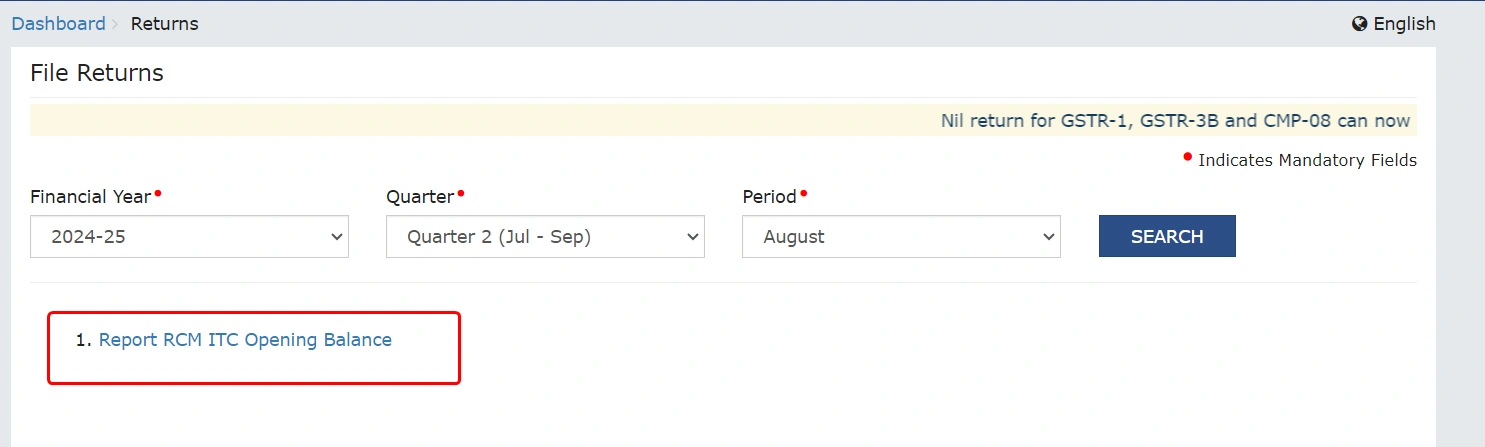
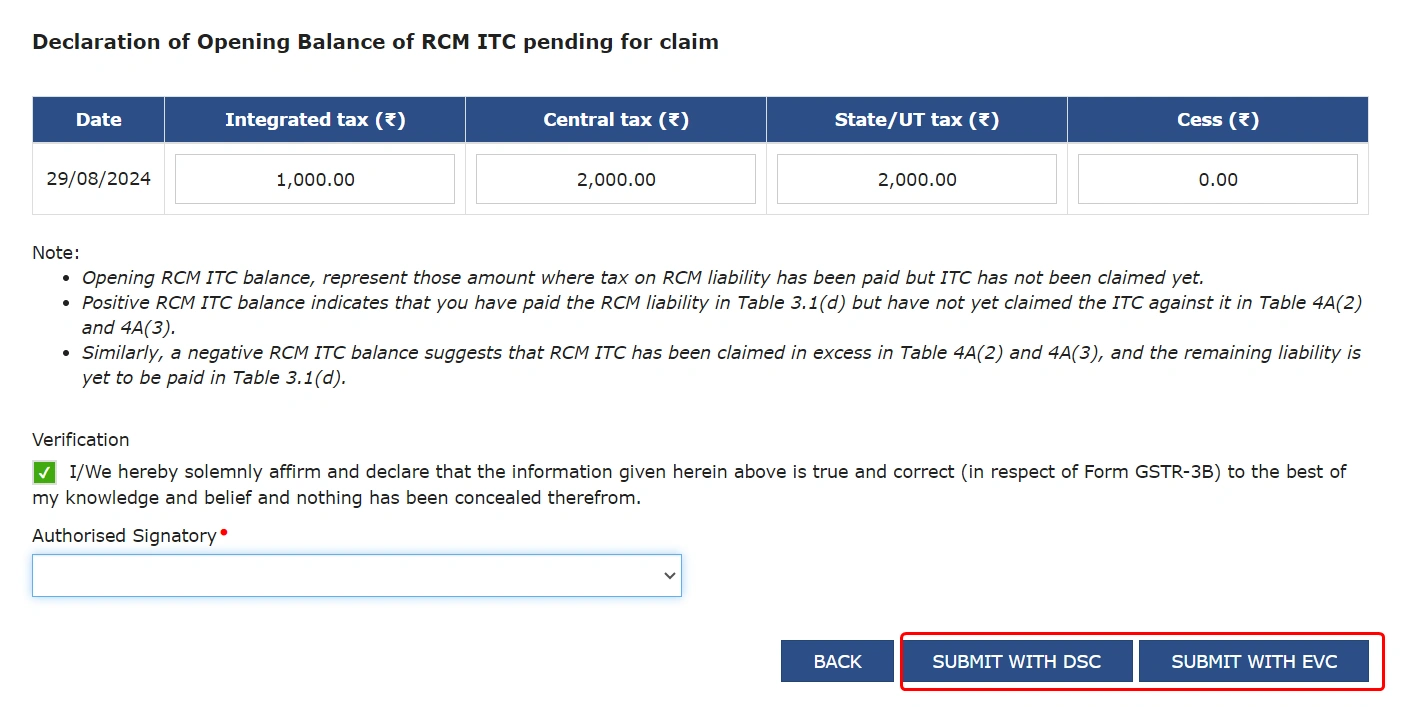
Report opening balance in RCM ITC statement by navigating as follows-
Login >> Report RCM ITC Opening Balance or Services >> Ledger >> RCM Liability/ITC Statement >> Report RCM ITC Opening Balance
Negative Balance in RCM ITC Statement
Negative balance implies the current period ITC claimed against RCM liability is more than the RCM liability of the current period plus the positive opening balance. As per a GSTN advisory dated 29th December 2025, negative balances will no longer be allowed in the RCM liability/ITC statement shortly. It means wherever the opening balance is negative, taxpayers will not be allowed to file GSTR-3B returns without reversing the excess ITC claimed against the RCM liability.
Earlier, only a warning message would be displayed to taxpayers for a negative balance. This new move will discourage the taxpayers from making excess ITC claims at the very source while filing GSTR-3B, thus avoiding any negative balances in the RCM ITC Statement.
Hence, the RCM ITC claimed in Table 4(A)2 & 4(A)3 shall be equal to or less than the combined values of RCM liabilities paid in Table 3.1(d) of the same GSTR-3B and closing balance of RCM Liability/ITC Statement. For a negative balance in the RCM Liability/ITC Statement, the taxpayer must either pay the additional RCM liability equivalent to the negative closing balance in Table 3.1(d) or reduce the ITC claimed in Table 4A(2) or 4A(3) to the extent of the closing balance in the current return period.
Example:
Let’s assume that the closing balance of the RCM Liability/ITC Statement is - INR 15,000. This means that INR 15,000 of excess RCM ITC has been claimed earlier. To resolve this and file your GSTR-3B, you can:
1. Pay the RCM liability: You can pay an additional INR 15,000 in Table 3.1(d) for the current return period to cover the excess ITC claimed.
OR
2. Reduce the ITC claimed: You can reduce INR 15,000 from the RCM ITC in Table 4A(2) or Table 4A(3) for the same period, if RCM ITC is available more than INR 15,000 in the current period.
Once either the excess RCM liability is paid or the requisite ITC is reduced from available ITC to match the negative closing balance, the discrepancy will be resolved, and you can proceed with filing your return.
Impact on GSTR-3B & GSTR-9 Filing
While filing GSTR-3B, the taxpayers get a warning message “Input Tax Credit taken in Table 4A(2) and 4A(3) exceeds the liabilities declared in Table 3.1(d) and the closing balance of the RCM liability ledger. Kindly correct the values to proceed further.”
It comes up if the sum of ITC claimed in Table 4A(2) (ITC on import of services) and Table 4A(3) (ITC on inward supplies liable to RCM) is more than the liability reported in Table 3.1(d) (Tax liability on inward supplies under RCM) plus the closing balance of the RCM ledger. There is a direct impact seen on GSTR-9 filing since the reconciliations are more regular and reflected in GSTR-3B.
Frequently Asked Questions


Clear offers taxation & financial solutions to individuals, businesses, organizations & chartered accountants in India. Clear serves 1.5+ Million happy customers, 20000+ CAs & tax experts & 10000+ businesses across India.
Efiling Income Tax Returns(ITR) is made easy with Clear platform. Just upload your form 16, claim your deductions and get your acknowledgment number online. You can efile income tax return on your income from salary, house property, capital gains, business & profession and income from other sources. Further you can also file TDS returns, generate Form-16, use our Tax Calculator software, claim HRA, check refund status and generate rent receipts for Income Tax Filing.
CAs, experts and businesses can get GST ready with Clear GST software & certification course. Our GST Software helps CAs, tax experts & business to manage returns & invoices in an easy manner. Our Goods & Services Tax course includes tutorial videos, guides and expert assistance to help you in mastering Goods and Services Tax. Clear can also help you in getting your business registered for Goods & Services Tax Law.
Save taxes with Clear by investing in tax saving mutual funds (ELSS) online. Our experts suggest the best funds and you can get high returns by investing directly or through SIP. Download Black by ClearTax App to file returns from your mobile phone.
Office Address - Defmacro Software Private Limited, C 245A, Ground floor, Room No 1, Vikas Puri, West Delhi, New Delhi, Delhi 110018, India
Cleartax is a product by Defmacro Software Pvt. Ltd.

ISO 27001
Data Center

SSL Certified Site
128-bit encryption