 GSTR-1
 GSTR-3B
 GSTR-9
 GSTR-9C
 GSTR-4
 GSTR-6
 GSTR-7
 GSTR-8
Compliance
Indirect tax solutions
Direct tax solutions
Company law solutions
Labour law solutions
ESG law solutions
Supply Chain
Invoice Discounting
Vendor Management
Predictable | Accurate | AI-powered
Smart recommended IMS actions
Enable PAN-level filing- GSTR-1 to 9C
AI-powered ITC reconciliation












Our cloud-based GST software tackles the ever-evolving GST system updates without any IT/SOP changes

Hard-locking in GSTR-3B
GSTN made Table 3.2 inter-state data, non-editable, starting July 2025 in GSTR-3B

Invoice Management System
Preparations & IMS reconciliations Headline to be only Invoice Management System

Input Service Distributor
Achieve accurate ITC distribution through automation and intelligent workflows
The best choice for always-on GST Compliance.
Secure cloud platform. Fully automated. Always in control

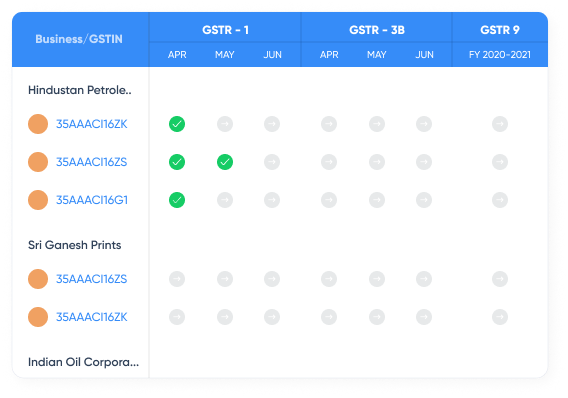
PAN-level, GSTR-1 to 9C
View, consolidate, and file returns across GSTINs from a single screen, even for 500+ docs.

3x faster experience
Complete GSTR-1 & 3B filing in 3 days vs 9-18 days per GSTIN every month

Smart error correction on UI
200+ validations automatically applied to flag ingestion errors

Future-proof compliance
Integrate once. No matter how tax regulations change, such as GSTR-3B hard-locking, IMS & more

AI powered matching
Match 10,000 documents in a minute, detect 100% tax credits

30+ smart reports
Get insight from a variety of PAN/multi-PAN level & comparison reports

Easy to connect
Stream your data directly from General Ledger (GL) in real-time for automated tax reporting

Table-4 automation
Auto-calculate ITC and populate Table-4 of GSTR-3B

99.99% uptime
Multiple redundancies, ensures your GST filings never go down
Stream your raw General Ledger (GL) data directly for tax reporting using Clear’s new technology— GL-Stream



Smart Recommended Actions
Get actionable insights post-reconciliation to address discrepancies with minimal effort

Avoid Notices
Minimise the risk of receiving notices due to inaccurate GSTR-2B data

Accurate GSTR-2B with Easy Reconciliation
Streamline your Purchase Register (PR) and reconciliation frequency to prevent ITC delays

Easy cross-collaboration for IMS actions
Get a Unique Key for every document to easily identifiable and trackable within the organisation

Maximised IMS Benefits
Update your PR every day with GL-Stream

Seamless and User-Friendly Interface
No additional work, IT updates, or SOP adjustments required


Pull GSTR-2A / GSTR-2B and historical GSTR-1 and 3B invoices
Get historical invoices from 2A report and even earlier filings with GSTR-1 and 3B

Pull at GSTIN or PAN level, across months and years
Select all GSTINs under a single PAN and pull invoices from GSTN since the inception of GST Act.

Pull without interruption at scale
Month-end? Large invoice count? Our reliable architecture ensures you can pull invoices seamlessly.


Maintain master directory of all your items and contacts, create once and use for ages
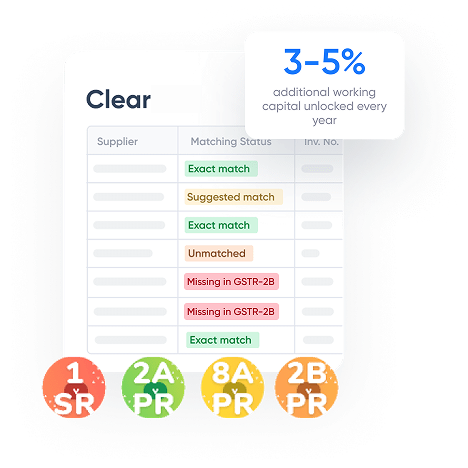
AI-powered reconciliation engine which suggests matches for invoices

Ensure accurate GSTR-2B with timely Purchase Register (PR) preparation & reconciliations

Feel free to accept, reject match suggestion and link or de-link a pair of invoices

Reconcile invoices by vendor and send custom emails and reminders at regular intervals

Generate smart reports for your team. Compare GST returns and invoices for any history, view balances for ledger and cash, get summaries by HSN.

Multi-PAN
Ultrafast Multi-PAN GSTR-3B data download for all GSTINs

GSTR 2B vs 3B vs books
ITC comparison at section level and GSTIN level and PAN Level

Table-4 snapshots
Download table4 snapshots

GSTR 9-8A Report
Download GSTR 9 Table 8a report And more than 25+ other reports

GSTR 1 vs 3B vs books
Tax Liability comparison at section level and GSTIN level & PAN Level

PAN GSTR 2B at Doc Level
GSTR-2B summaries for multiple months and GSTINs at doc level


Compliance with Industry Standards
ISO 27001 certification and SOC 2 compliance demonstrate adherence to international standards for data security, confidentiality, and privacy
Robust Data Protection Measures
AES-256 encryption for data at rest and in transit, IP whitelisting, and end-to-end secure APIs protect user data from unauthorised access and vulnerabilities
Audit and Data Governance
Supports full audit trails and compliance-driven data archival and retrieval systems, fostering transparency and long-term regulatory compliance

Continuous Security Monitoring
Regular VAPT (vulnerability assessment and penetration testing) and advanced monitoring for proactive real-time threat detection and mitigation.
Granular Access Control
Implements branch-level controls for e-invoicing and EWB, user access management, and 2FA

We saw an exceptional increase in efficiency of 800% after subscribing to the Clear Invoicing solution. We are extremely happy as Clear simplified our business operations! We now enjoy automated invoicing across our customer and supplier journey. It has directly impacted our unit economics by eliminating all manual invoicing processes.




GST refers to the Goods and Services Tax, an indirect tax levied and collected on the supply of goods and services in India. It is a unified, multi-stage, consumption-based tax levied at national level, subsuming multiple indirect taxes such as excise duty, VAT, central sales tax, service tax, etc.
GST return is a report filed with the tax authorities with a summary of sales, purchases, tax liability and input tax credit claimed for the tax period. The GST return can be filed by taxpayer either on GST portal or through a trusted GST software such as ClearTax GST.
GST introduced us to ‘One nation, one tax’. There are plenty of benefits to taxpayers introduced by the GST. It helped remove the cascading tax effect (the tax-on-tax effect). One can avail the input tax credit without hiccups while the GST filing is streamlined and made easy with online filing. GST subsumed a variety of indirect taxes, simplifying the indirect tax structure in India. Many unorganised sectors were brought under the GST regulation too.
Small businesses and taxpayers with a turnover of less than Rs.1.5 crore (Rs.75 lakh for special category states) can opt for the composition scheme where they will be taxed at a nominal rate of 0.5% or 1% (for manufacturers) CGST and SGST each (rates as per the latest proposed changes in the Goods and Services Tax bills).
Under GST, Input tax credit (ITC) is available for all purchases of taxable goods or services unless it is specifically blocked under Section 17(5) of the CGST Act or used for exempted supplies.
The number of GST returns depends on the type of taxpayer. Ideally, a regular taxpayer must file 26 returns every year (12 GSTR-1, 12 GSTR-3B, 1 GSTR-9 and 1 GSTR-9C). There are additional returns filed for special circumstances, such as GSTR-6, GSTR-7, and GSTR-8, in addition to forms such as ITC-04.
The Invoice Management System (IMS) under GST is a useful tool for recipients of ITC on the GST Network to track and verify the accuracy of purchase documents as reported by suppliers. It helps avoid fraud and erroneous ITC reporting in GSTR-2B and eventually mismatches.
GST reconciliation is a process of matching your sales and purchase data in GST returns (such as GSTR-1/3B) with your ERP and supplier-reported data (such as GSTR-2A/2B) to identify and rectify discrepancies. You can also automate this process using a GST solution. This step ensures accurate Input Tax Credit (ITC) claims and compliance with GST regulations.
GST filing software helps fetch GSTR-2B data from the GST portal as well as purchase register with a few clicks. GST return filing software by ClearGST runs an AI-based reconciliation engine to match the two data sets using custom logics to provide reconciled data bucketed into matched, mismatched, partially matched and missing for further automated auto-fill into Table 4 of GSTR-3B.
ClearGST is GST Cleartax software that is a cloud-based SaaS GST return filing solution that supports reconciliations, return preparation and filing of GSTR-1 to GSTR-9C, including GSTR-4 and GSTR-6 online through automations at every stage.
The following are the quintessential features of GST software by ClearGST-
ClearGST’s AI-powered matching tool enables accuracy and limits manual intervention, offering the industry's highest matching percentage. Run 150+ fuzzy logic rules, set custom rules and thresholds, and witness 1: many and many: many matching done at the PAN level.
GST ClearTax is the best GST software in the industry for advanced compliance technology. We enable the unblocking of 3-5% of working capital for enterprises through tax savings with our cutting-edge AI and ML technology. Get a dedicated key account manager and tax expert for smoother compliance. Witness real-time system updates instead of manual updates. We offer a higher matching percentage with proprietary reconciliation logics and customised rules with automated many-to-many, 1-to-many matching capabilities, unlike most GST solutions in the industry.
Stream your data using GL-Stream from your ERP into the GST software to make sales and purchase registers or use custom mappers to import data effortlessly. Fetch GSTN’s GST data and run reconciliation applying custom logic. Complete reporting into GSTR-1, automate Table-4 reporting in GSTR-3B and file with a few clicks using reconciled data.
ClearGST is a cloud-based solution and not a desktop solution.
ClearTax GST is the best GST return filing software to solve GST return filing issues for various users and industries, ranging from practising tax professionals to growing businesses, e-commerce operators and large enterprises.
Have queries? Visit our support center

Clear offers taxation & financial solutions to individuals, businesses, organizations & chartered accountants in India. Clear serves 1.5+ Million happy customers, 20000+ CAs & tax experts & 10000+ businesses across India.
Efiling Income Tax Returns(ITR) is made easy with Clear platform. Just upload your form 16, claim your deductions and get your acknowledgment number online. You can efile income tax return on your income from salary, house property, capital gains, business & profession and income from other sources. Further you can also file TDS returns, generate Form-16, use our Tax Calculator software, claim HRA, check refund status and generate rent receipts for Income Tax Filing.
CAs, experts and businesses can get GST ready with Clear GST software & certification course. Our GST Software helps CAs, tax experts & business to manage returns & invoices in an easy manner. Our Goods & Services Tax course includes tutorial videos, guides and expert assistance to help you in mastering Goods and Services Tax. Clear can also help you in getting your business registered for Goods & Services Tax Law.
Save taxes with Clear by investing in tax saving mutual funds (ELSS) online. Our experts suggest the best funds and you can get high returns by investing directly or through SIP. Download Black by ClearTax App to file returns from your mobile phone.

ISO 27001
Data Center

SSL Certified Site
128-bit encryption
Looking for a business loan
Thank you for your interest, our team will get back to you shortly


