Form ITR-V stands for 'Income Tax Return-Verification' Form. It is a single-page document that is received when an ITR is filed online without a digital signature. Taxpayers can download a copy of ITR-V from the income tax e-filing website.
FY 2025-26 (AY 2026-27) Update
Form ITR-V for FY 2025-26 (AY 2026-27) has been notified by the CBDT.
What is ITR-V?
ITR-V is a document generated when you have e-verified your ITR. It serves as a proof that you have e-verified your ITR. t contains high-level information extracted from your ITR like taxable income, taxes paid, TDS deducted, refund eligible, etc. Previously, ITR-V form needs to be signed by the taxpayer and sent to the Centralized Processing Center - Bangalore. However, that requirement does not exist now, since returns are e-verified electronically.
What is E-Verification of ITR?
E-verification is the last step of filing ITR. After successfully filing ITR, you need to e-verify it within 30 days of filing. Non-compliance of which can render ITR invaild. It can be done via digital signature, net banking or Aadhar based OTP.
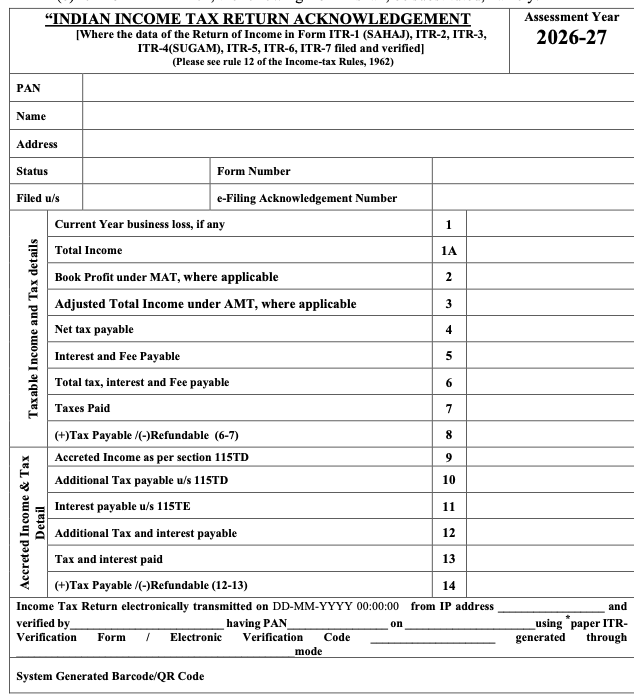
ITR-V Acknowledgement Format
The following image shows the format of ITR-V acknowledgement.
Choose 'I would want to verify using OTP on the mobile number registered with Aadhaar' and click 'Continue' on the 'e-Verify' page.
You must check the box next to 'I agree to validate my Aadhaar details' and then click 'Create Aadhaar OTP'.
Your registered cellphone number will receive an SMS with the 6-digit OTP.
2. ITR verification via net banking
Choose 'Via Net Banking' and click 'Continue' on the 'e-Verify' page.
Choose the bank where you wish to validate your ITR and press the 'Continue' button.
A disclaimer will appear on your screen as a pop-up. Read and then press the 'Continue' button.
Log in to your bank account's net banking. Choose the e-verify option, generally found under the 'Tax' page. You will be transferred to the income tax department's e-filing website.
Go to the appropriate ITR form and select e-verify. Your tax return will be successfully e-verified.
3. ITR verification via bank account
The third method of validating an ITR is to generate an Electronic Verification Code (EVC) through one's bank account. To create EVC, you must have a pre-validated bank account. Remember that pre-validation of a bank account is required to get an income tax refund.
Choose 'Via Bank Account' and click 'Continue' on the e-verify screen. The EVC will be generated and sent to the mobile number and email address associated with your EVC-enabled bank account.
Input the EVC received on your registered mobile number and email address and click on e-verify.
4. ITR verification via Demat account
The method of certifying ITR via a Demat account is similar to that of validating ITR via a bank account.
Choose 'Via Demat Account' and click 'Continue' on the e-verify screen. The EVC will be generated and sent to the cellphone number and email address associated with your EVC-enabled Demat account.
Enter the EVC obtained on your registered mobile number and email address and click e-verify.
5. ITR verification via bank ATM
EVCs can also be generated with a bank ATM card. This service is only provided through a few banks: Axis Bank, Canara Bank, Central Bank of India, ICICI Bank, IDBI Bank, Kotak Mahindra Bank, and State Bank of India.
Swipe your ATM card at your bank's ATM, input your ATM PIN, and select 'Create EVC for Income Tax Filing'. An EVC will be delivered to your registered mobile number and email address with the e-filing portal. Remember that your PAN must be registered with the bank.
Go to the 'e-verify returns' tab. To verify the ITR, pick the option 'I already have an Electronic Verification Code' (EVC). Input the EVC code and press the e-verify button.
Click on 'e-file' tab > Go to ‘Income Tax Returns’> Click on ‘View Filed Returns’
You can find the income tax returns filed for all the assessment years along with their processing status. You can select the year and click on ‘Download Form’ to download the ITR. In the downloaded form, we can find the processing status of the ITR and know if there is an outstanding demand or refund.
Conclusion
Form ITR-V is an essential document that serves as proof that your Income Tax Return (ITR) has been successfully filed for the financial year. It is generated after submitting your ITR electronically and needs to be verified by either e-verification or submitting a physical copy to the Income Tax Department. By following the steps outlined above, you can easily download and access your ITR-V Acknowledgement PDF.
The document will be password-protected in order to be accessed by the appropriate tax payer. The password can be a combination of the PAN number (lowercase)and Date of Birth in the format of DD-MM-YYYY.
What is the due date for submitting the ITR-V for verification?
The time limit for Submitting the ITR-V or to do the e-verification is within 30 days of Filing the returns. Earlier, it was 90 days.
What happens when the form is not submitted on time?
If the form is not submitted on time within 30 days of filing of your income tax returns your return becomes invalid, could not be processed further and it will be treated as if you have never filed the income tax return. If done after 30 days, the date of e-verification will be treated as the return filing date.
Is it possible to verify the income tax return without submitting Form ITR-V?
Yes, the income tax return can be verified without Form ITR-V. The verification can be done electronically through your email ID, phone number, PAN card, or Aadhaar card.
What is the difference between ITR and ITR-V?
ITR V means Income tax acknowledgement copy consisting of a summary of the return filed, whereas ITR form consists of all your income, deductions, personal details etc. In case, if you prefer to verify the return using a physical signature, then the ITR V form needs to be signed manually and posted to CPC, Bengaluru within 30 days of filing the returns.
What is ITR-V acknowledgment Form?
ITR Form-V is a document issued by the income tax department when tax returns are filed successfully. The filing process is complete on E-verification
If ITR-V is sent by speed post, which date is considered as the date of verification?
If ITR-V is sent via speed post, the date at which ITR-V is received at the CPC, Bengaluru, is considered the date of verification.
Clear offers taxation & financial solutions to individuals, businesses, organizations & chartered accountants in India. Clear serves 1.5+ Million happy customers, 20000+ CAs & tax experts & 10000+ businesses across India.
Efiling Income Tax Returns(ITR) is made easy with Clear platform. Just upload your form 16, claim your deductions and get your acknowledgment number online. You can efile income tax return on your income from salary, house property, capital gains, business & profession and income from other sources. Further you can also file TDS returns, generate Form-16, use our Tax Calculator software, claim HRA, check refund status and generate rent receipts for Income Tax Filing.
CAs, experts and businesses can get GST ready with Clear GST software & certification course. Our GST Software helps CAs, tax experts & business to manage returns & invoices in an easy manner. Our Goods & Services Tax course includes tutorial videos, guides and expert assistance to help you in mastering Goods and Services Tax. Clear can also help you in getting your business registered for Goods & Services Tax Law.
Save taxes with Clear by investing in tax saving mutual funds (ELSS) online. Our experts suggest the best funds and you can get high returns by investing directly or through SIP. Download Black by ClearTax App to file returns from your mobile phone.
Office Address - Defmacro Software Private Limited, C 245A, Ground floor, Room No 1, Vikas Puri, West Delhi, New Delhi, Delhi 110018, India
Cleartax is a product by Defmacro Software Pvt. Ltd.

