 Call Now
Voter Slip Download - How To Download Voter Slip?
The voter slip download 2026 process allows registered voters to access their Voter Information Slip (VIS). Applicants must download voter slip to know details such as polling booth location, part number, and polling date.
Key Highlights
- Download methods: Available via Citizen Service Portal and Voter Helpline App.
- Search options: EPIC number, mobile number, or personal details.
- Use for ID purposes: Voter slip is not a valid ID proof for voting.
What is a Voter Slip?
A voter slip or 'Voter Information Slip (VIS)' is a document issued by the Election Commission of India (ECI) which helps voters locate their polling booth and verify their electoral roll details.
It contains details of a voter, such as a name, age, gender, assembly constituency, polling station location, and the date and time of the poll. Though the VIS contains personal and polling information, it cannot be used as a standalone identification document for voting.
How to Download Voter Slip Online?
The steps below are to be download the voter slip online:
Step 1: Log in to the official Citizen Service Portal.
Step 2: Click on the ‘Search in Electoral Roll’ tab on the homepage.
Step 3: Select any one of the options - ‘Search by Details’, ‘Search by EPIC’ or ‘Search by Mobile’.
Step 4: Enter the required information and captcha code and click ‘Search’.
Step 5: The system will provide your details. You can further check if your details are correct by clicking on ‘View Details’ under the ‘Action’ column.
Step 6: The voter details will be displayed. Click on the ‘Print Voter Information’ button.
How to Download Voter Slip Using Voter Helpline App?
The Voter slip can be downloaded through the Voter Helpline mobile app by following the steps below:
Step 1: Download and install the ‘Voter Helpline App’ from the Google Play Store.
Step 2: Log in by entering your mobile number and password registered on the Voters' Services Portal website, or register as a ‘New User’ if registered on the website and log in to the app.
Step 3: Click on the ‘Search Your Name in Electoral Roll’ option.
Step 4: Select any one of the options - ‘Search by Mobile’, ‘Search by Bar/QR Code’, ‘Search by Details’ or ‘Search by EPIC No.’.
Step 5: Enter the required information and click ‘Search’.
Step 6: The voter details will be displayed. Click on the ‘Download’ icon.
Information on Voter Slip
The voter slip will contain the following information:
- Name
- Age
- Relative's name
- Gender
- EPIC number/Voter number
- Parliamentary constituency number
- Polling station address
- Polling station
- Part number
- Part Serial Number
- Polling date
Voter Slip Format
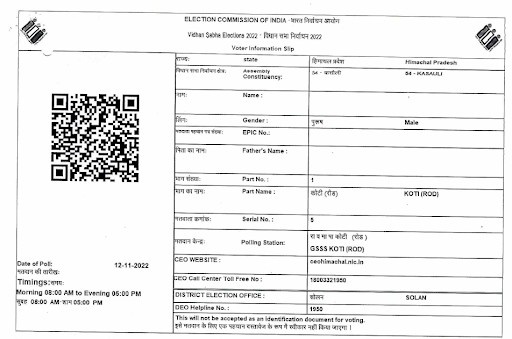
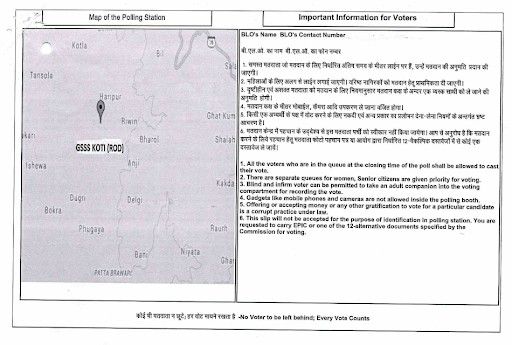
The Election Commission of India (ECI) follows a standard format for issuing physical Voter Information Slips (VIS) to ensure consistency and easy verification of voter details.
- The VIS is typically printed on good quality paper, usually half of an A4 size (approximately 8 × 6 inches).
- The front side contains voter details such as name, constituency, polling station location, and polling date and time.
- The back side includes a map or directions to the polling station along with important instructions for voters.
- The VIS may also include a QR code that can be scanned using official apps like the Voter Helpline App for quick verification of voter details.
A sample of a physical voter slip issued by the ECI is shown below.
I. Front side
The following image shows the front side of the Voter ID:
II. Back side
The following image shows the back side of the Voter ID:
Voter Slip Download for State Elections 2026
Voters can download their Voter Information Slip (VIS) for upcoming state elections in 2026 through official platforms after verifying their name in the electoral roll. In 2026, major state elections are expected in Kerala, Tamil Nadu, West Bengal, Assam, and Puducherry.
Voter Slip vs Voter ID vs e-EPIC
The table below highlights the key differences between them based on usage, format, and validity.
| Feature | Voter Slip (VIS) | Voter ID (EPIC) | e-EPIC (Digital Voter ID) |
| Issued By | Election Commission of India (ECI) | Election Commission of India | Election Commission of India |
| Format | Paper/PDF information slip | Physical laminated card | Secure downloadable PDF |
| Contains | Polling booth address, part no., serial no., polling date/time | Photo, EPIC number, voter details, address | Same as EPIC in digital form |
| Primary Purpose | Helps locate polling booth & confirm electoral roll details | Official ID proof for voting & verification | Digital ID alternative to physical EPIC |
| Valid as ID at Polling Booth? | No | Yes | Yes |
| When Used | For convenience on polling day (booth navigation) | Identity verification at polling station | Identity verification when digital format is accepted |
| How to Get It | Download from Voter Helpline App or ECI portals | Issued after voter registration | Download from Citizen Service Portal or Voter Helpline App |
| Mandatory for Voting? | No | Yes (if no other approved ID is carried) | Yes (equivalent to EPIC) |
Voter slip download 2026 helps verify polling booth details, election date, and voter information before election day. The Election Commission of India (ECI) has simplified the voter slip download process through the Citizen Service Portal and Voter Helpline App.
Related Articles:
1. NVSP Portal Login, How To Register And Status Check
2. Voter Registration Process: How to Register to Vote in India?
3. Voter ID Download: How To Download Voter ID Card Online?
4. How to Download and Fill Form 6 For Voter ID Card?
5. How to Apply and Get Duplicate Voter ID Card?
6. Voter List – How to Check Your Name & Download the Voter List?
7. Link Aadhaar With Voter ID: How To Link Voter ID with Aadhaar card?
8. Voter ID Name Change - How To Change Name In Voter ID Card?
9. Voter ID Address Change: How to Change Address Details on Voter ID Card?
10. How To Download Voter ID Card Online?
11. Digital Voter ID Card - How to Apply and Download Digital Voter ID Card?
12. Voter ID Details - How To Check Voter ID Details?
13. How To Transfer a Voter ID Card After Marriage Online?
14. Voter ID Card - Apply Online for Voter ID Card, Track Status, Eligibility And Documents Required
Frequently Asked Questions



Cleartax is a product by Defmacro Software Pvt. Ltd.

ISO 27001
Data Center

SSL Certified Site
128-bit encryption