Axis Bank NEFT Charges - Benefits, Timings, NEFT Form and How to Transfer
Axis Bank provides National Electronic Funds Transfer (NEFT) service for its customers for quick transfer of funds. With this service, customers can transfer money between Axis Bank accounts and accounts held in other banks, pay bills and make credit card payments.
What are Axis Bank NEFT Charges?
Below are the details of Axis Bank NEFT charges:
| Transaction Amount | Maximum Charge (Excluding GST) |
| Up to ₹10,000 | ₹2.50 + GST |
| Above ₹10,000 to ₹1 Lakh | ₹5.00 + GST |
| Above ₹1 Lakh to ₹2 Lakhs | ₹15.00 + GST |
| Above ₹2 Lakhs | ₹25.00 + GST |
How to Make NEFT Axis Bank Transfers?
Axis Bank offers a simple and efficient process for transferring funds via NEFT, whether to accounts in other banks or within Axis Bank itself.
I. NEFT Transfers from Axis Bank to Other Banks
- Log in to Axis Bank internet banking with your Login ID and password.
- Navigate to the ‘Transfer Funds’ menu and select ‘Other Bank Account’.
- Add payee to add a new beneficiary to whom you want to send money. Once the payee is added, select the payee.
- Enter the amount to be sent, select ‘NEFT’ and click ‘Proceed’.
- Once the transaction is processed, you will receive a confirmation message.
II. Transferring Funds from Axis Bank to Axis Bank
- Log in to Axis Bank internet banking with your Login ID and password.
- Navigate to the ‘Transfer Funds’ menu and select ‘Within Bank Account’.
- Enter the required details, including the payee’s name, account number, and IFSC code.
- Enter the amount to be sent, select ‘NEFT’ and click ‘Proceed’.
- Once the transaction is processed, you will receive a confirmation message.
Axis NEFT Timings
Axis Bank offers NEFT transactions 24x7 through Retail Internet Banking (RIB), Mobile Banking, and Corporate Internet Banking (CIB). Below are the details of Axis NEFT processing timings and transaction limits:
| Day | Timings | Limit |
| All working days | 7:00 a.m. to 7:00 p.m. | No limit on the transaction amount and gets processed in real-time. |
| All working days | 7:00 PM to 7:00 AM | Up to ₹1 crore per transaction. Funds above ₹1 crore will get processed on the next banking day or hour. |
| On second and fourth Saturdays, Sundays and Bank holidays | 24x7 | Up to ₹1 crore per transaction. Funds above ₹1 crore will get processed on the next banking day or hour. |
How do You Pay Your Credit Card Bill through the NEFT of Axis Bank?
To pay your credit card bill using Axis Bank’s NEFT service, follow these simple steps:
- Log in to Axis Bank internet banking with your Login ID and password.
- Add the credit card as a beneficiary.
- Go to the ‘Transfer Funds’ section and select ‘Other Bank Account’.
- Select the credit card as payee, enter the amount, review the details and click ‘Proceed’.
- Once the payment is processed, you will receive a confirmation message.
Axis Bank NEFT Form
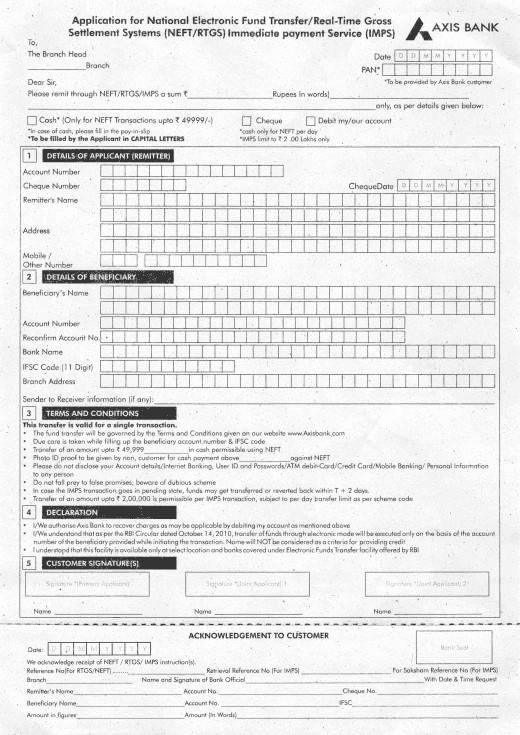
To initiate NEFT transfers at an Axis Bank branch, you will need to fill in the NEFT form and hand this form over to a bank staff member along with payment. Below is the specimen of an Axis Bank NEFT form:
Axis Bank NEFT Transaction Requirements
To successfully initiate an NEFT transaction through Axis Bank, you must provide the following details:
- The account number from which the funds will be debited.
- The total amount to be sent.
- The payee’s name, account number, and IFSC code.
- The payee’s bank name and branch address.
- Any specific instructions or additional information the sender wishes to convey.
- Remitter’s name, address and mobile number, if done offline by submitting the NEFT form to the bank.
- The signature of the remitter, if done offline by submitting the NEFT form to the bank.
Benefits of Axis Bank NEFT Service
Axis Bank NEFT supports smooth and flexible fund transfers across different banking needs.
- Secure transfer of funds between Axis Bank and other bank accounts.
- Available through multiple channels such as internet banking, mobile banking, and branch initiation.
- Cost-effective option, with low or no charges for online transactions.
- Suitable for a wide range of payments, including bill payments and credit card dues.
- Provides confirmation and tracking for each transaction.
Limitations of Axis Bank NEFT Service
NEFT transfers may have some limitations related to processing time and transaction limits.
- NEFT transactions are processed in batches, so transfers may take some time to be completed instead of being instant.
- A transaction initiated after a designated settlement time will be processed in the next slot.
- Axis Bank has set the maximum NEFT transfer limit of up to ₹10 lakh per transaction for an individual account holder.
- Higher limits may apply for businesses, subject to the bank’s internal policies and agreements.
Axis Bank provides multiple fund transfer options designed to meet different customer needs. NEFT allows fast, secure, and cost-effective transfers, whether sending small amounts, urgent payments, or high-value transactions.
Related Articles:
1. Canara Bank NEFT Charges
2. Bank of Baroda NEFT Charges
3. PNB NEFT Charges
Frequently Asked Questions


Clear offers taxation & financial solutions to individuals, businesses, organizations & chartered accountants in India. Clear serves 1.5+ Million happy customers, 20000+ CAs & tax experts & 10000+ businesses across India.
Efiling Income Tax Returns(ITR) is made easy with Clear platform. Just upload your form 16, claim your deductions and get your acknowledgment number online. You can efile income tax return on your income from salary, house property, capital gains, business & profession and income from other sources. Further you can also file TDS returns, generate Form-16, use our Tax Calculator software, claim HRA, check refund status and generate rent receipts for Income Tax Filing.
CAs, experts and businesses can get GST ready with Clear GST software & certification course. Our GST Software helps CAs, tax experts & business to manage returns & invoices in an easy manner. Our Goods & Services Tax course includes tutorial videos, guides and expert assistance to help you in mastering Goods and Services Tax. Clear can also help you in getting your business registered for Goods & Services Tax Law.
Save taxes with Clear by investing in tax saving mutual funds (ELSS) online. Our experts suggest the best funds and you can get high returns by investing directly or through SIP. Download Black by ClearTax App to file returns from your mobile phone.
Office Address - Defmacro Software Private Limited, C 245A, Ground floor, Room No 1, Vikas Puri, West Delhi, New Delhi, Delhi 110018, India
Cleartax is a product by Defmacro Software Pvt. Ltd.

ISO 27001
Data Center

SSL Certified Site
128-bit encryption